
Last year with forScore 12.0.5, we added a feature that allows you to turn pages using head movements while wearing AirPods Pro. Now, we’ve learned that this feature also works with AirPods Max and AirPods 3.
Ultimately, which devices support this functionality is up to Apple and can change at any time—either with a firmware or OS update—and since they don’t publish this information publicly we have to rely on hands-on testing to find out what does and doesn’t work. If you’ve got AirPods Max or AirPods 3 be sure to check it out!
We’re happy to announce that forScore 13 is now available for macOS, bringing great features like multi-window support, page flagging, and iCloud Syncing to the Mac. Of course, forScore 13 is fully optimized for macOS 12 Monterey with full support for the new Shortcuts app, so it’ll be ready on launch day (Apple has announced that macOS 12 will be available as a free update beginning on Monday, October 25th).
Available now for iPad, Mac, iPhone, and iPod Touch
Today we’re happy to announce that with our first free update for Piano with Friends, SharePlay is now available for devices running iOS 15.1 or iPadOS 15.1. We’re still waiting for more information on when SharePlay will be coming to macOS, but a similar update will bring this exciting feature to the Mac as soon as possible. Thanks very much to everyone who has bought it so far, we appreciate your support for our newest app and this great new collaborative experience.
September 21, 2021
| News
Our latest app, Piano with Friends, is available now for iPad, Mac, and iPhone as a one-time Universal Purchase. Designed around Apple’s SharePlay feature, this standalone piano app features a resizable and tunable keyboard with fun animations and MIDI support. It also supports fully customizable keyboard typing and custom shortcuts so you can play with a standard computer keyboard.
Piano with Friends is available now for iOS, iPadOS, and macOS. SharePlay support requires iOS 15.1 and iPadOS 15.1, and will be coming soon to the Mac with a free update.
Available now
September 20, 2021
| News
Today we’re very excited to announce the immediate release of forScore 13 with multi-window support, page flagging, iCloud Syncing, a significant design refresh, themes, integration with the Shortcuts app, and a whole lot more. All of this comes to iOS and iPadOS, including optimizations and enhancements based on new features and capabilities Apple added with today’s major updates to both platforms. Coming soon also to the Mac, forScore 13 is fully optimized for macOS 12 Monterey and will be released as soon as Apple allows us to do so.
It has been a big, busy year for us and there’s still more to come, so thank you all once again for your incredible support, feedback, and passion. Thanks especially to our beta testers who helped us get here today, we sincerely appreciate it!
Available now for iPad, iPhone, and iPod Touch
September 17, 2021
| News
Apple’s latest major OS updates are arriving soon, and we know some of you are trying to decide whether to install it immediately or wait a little while instead.
As always, our general advice is this: if you can deal with a few weeks of instability and occasional bugs, and you don’t rely on forScore professionally, upgrade whenever you like. Otherwise, you might want to consider holding off for a few days or weeks until things settle down. Like Apple, we extensively beta test our updates but a few issues inevitably slip through. With that said, here’s where things stand right now with our apps and each of Apple’s platforms:
iOS 15 & iPadOS 15
We’ve been working hard on our next update to forScore, version 13.0, which adds dozens of new features, has been optimized for these latest OS versions, and takes full advantage of their new capabilities. We’ll be releasing it on Monday, September 20th alongside iOS 15 and iPadOS 15. At this time, we’re not aware of any major issues with forScore 12.1 running on these OS versions, but generally speaking if you’re planning to install these system updates it’s best to update forScore as well.
Things can still change between now and Monday, but as far as we can tell there are no issues with any of our other apps running on iOS 15 or iPadOS 15, so you should feel free to upgrade whenever you’re ready.
watchOS 8
Although we just barely got our first look at the new Apple Watch Series 7, we built and tested our one and only watchOS app (Pitch, Please!) with Apple’s latest tools and device simulators and everything appears to be working beautifully. Barring any last-minute changes, it should be fully compatible with and optimized for watchOS 8.
macOS 12
Apple didn’t mention macOS this past Tuesday, which likely means their latest major update won’t be coming until next month. All of our apps are already compatible with this release or will be updated for it as soon as Apple allows us to do so.
September 15, 2021
| News
Today we’re happy to announce the release of Pitch, Please! 3.1, the latest update to our pitch pipe app. Featuring a refreshed design, this version is ready for all of Apple’s latest devices—including the new iPad mini and Apple Watch Series 7—and has been fully optimized for iOS 15, iPadOS 15, and watchOS 8 (an update for Mac will be coming along with the release of macOS 12 later this year). It’s a free update from all previous versions.
Available now
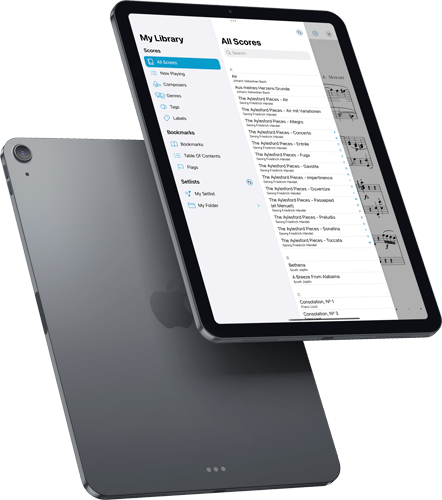
Today we’re very excited to give you a sneak peek at forScore 13, coming later this year along with iOS 15, iPadOS 15, and macOS 12. Featuring a significant design overhaul, page flags, iCloud syncing for everyone, Shortcuts, and multi-window support that showcases a brand new interface built from the ground up using the latest technologies and standards, it really raises the bar and helps you get the most out of your digital music library.
forScore 13 will be released later this year along with Apple’s major OS updates, but you can try it out for yourself today by becoming a beta tester. Otherwise, be sure to check back soon as we head into the most exciting time of the year!
forScore 13 Sneak Peek
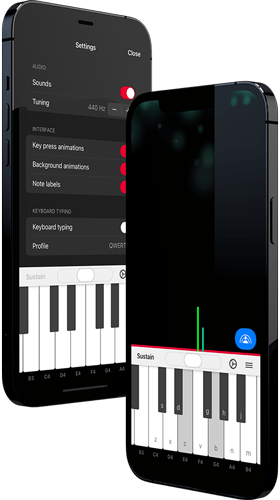
Over the past few months we’ve been working on a brand new app based on forScore’s on-screen piano keyboard, called Piano with Friends. This standalone version includes the same great features like a high quality sound bank, fine tuning, note labels, and MIDI support, but it also includes some new features that really make it deserving of its own app.
First, it supports typing input so you can play by pressing keys on a standard computer keyboard. There are several built-in layouts, but it also supports custom configurations so you can use it no matter which kind of keyboard you have. It’s the first of its kind that we’ve seen and we think it provides a great and highly flexible solution for everyone.
Piano with Friends, as the title hints, supports Apple’s forthcoming SharePlay feature which allows you to participate in group activities while on a FaceTime call. That means you can play piano with anyone, anywhere in the world.
All of that and more will be coming soon to iOS, iPadOS, and macOS, but we’re ready to start beta testing today. Just click this link to join our public beta and let us know what you think, or click below to learn more about our newest app.
Update: beta testing for this app has now ended, and Piano with Friends is available now on the App Store for iOS, iPadOS, and macOS as a single universal purchase.
Learn More
Today we’re proud to announce the release of forScore 12.1 with iCloud Syncing, available first to forScore Pro subscribers as part of their Early Access benefits. This update actually includes a ton of other improvements and enhancements for everyone, though, so we wanted to take a moment to point out a few of them:
Contextual Menus: Apple designed touch-compatible contextual menus to work with single items, but this limitation always seemed unnecessary to us. With forScore 12.1 we’ve managed to improve this—everywhere that forScore supports edit mode and multiple item selection, you can now pick two or more items and then tap and hold any one of them (or right click on it) to work with all of those items at once. We’ve also added a contextual menu to the title bar display so you can quickly perform common tasks with the current item.
Show In Library: One of the actions in the title bar’s new contextual menu is “Show In Library” and it reopens whichever menu you used to navigate to the current score. For instance, if you choose a score from the composer “Mozart” and later navigate to the “Classical” genre, this action reopens the Score menu and returns you to the “Mozart” list, scrolling to the current item and highlighting it for you. This new action is also available for configuration via the Page Turners & Shortcuts and Gestures settings panels.
Mac Upgrades: Late last year we introduced forScore for Mac and we’ve been working furiously ever since to make it even better. We brought one of forScore 12’s biggest new features, enhanced support for external displays, to the Mac by making it open up a secondary window that you can move to any monitor. We fine-tuned performance, squished bugs, made the sidebar resizable, and added subtle hover effects to a number of interface elements to make them feel more natural when used with a cursor.
Improvements: We spent most of our time working hard to build iCloud Syncing, but we also intentionally focused on “quality of life” improvements—little touches that really add up. We adopted iOS/iPadOS 14’s pull-down menus in more places, enhanced setlist pickers to use folder-based navigation, and we added right-click menus to the page and even to the tab bar so you can do many of the same things we discussed earlier but for any item open in a tab. Finally, we made changes to our default settings that will help mitigate the the worst effects of a system bug that Apple still hasn’t fixed a year later; hopefully that saga ends soon.
All of these changes and many others add up to the best version of forScore yet—still offered as a free upgrade for all users. Thank you all for your tremendous support and feedback!
Available now for iPad, Mac, iPhone, and iPod Touch


